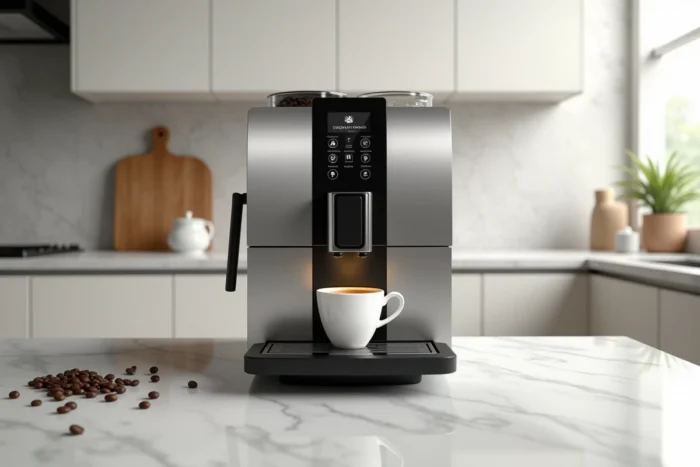
When you take the Saeco Picobaristo Deluxe out of its box, the first question isn’t how many drinks it can prepare. It’s more about how to adjust the grind so that the coffee doesn’t flow too quickly or too slowly. This Saeco automatic machine, with its touchscreen and integrated milk carafe, offers real customization options, but it requires a minimum of handling to perform at its best.
Grind Adjustment and Coffee Bean Selection on the Picobaristo Deluxe
You often start with the intermediate grind setting, and that’s the right choice. The adjustment knob, accessible by lifting the lid of the bean container, can only be adjusted when the grinder is running. If you turn it when it’s off, you risk jamming the burrs.
Turning it one notch finer slows down the flow and enhances the body of the espresso. One notch coarser speeds up the percolation and lightens the cup. You adjust based on the result in the cup, not according to a universal recipe.
Arabica/robusta blends perform better in automatic machines, with more body, especially for milk-based drinks like cappuccino or latte macchiato. The choice of coffee beans has a direct impact that is often underestimated.
On the other hand, very dark roasts clog the grinder and coffee group faster due to the oily residues they release. If you use this type of beans, cleaning the brewing group cannot wait for the standard frequency suggested by the machine.
You can find the available grind settings and the exact procedure for safely adjusting the settings in the user manual for the Saeco Picobaristo Deluxe coffee machine.
Removable Coffee Group: Cleaning and Frequency Based on Your Actual Usage
The coffee group (or brewing group) of the Picobaristo Deluxe is removable, which greatly simplifies maintenance compared to machines with a fixed block. You remove it through the side hatch, rinse it with clear water, and let it dry before putting it back in place.
The manual recommends a weekly rinse. But this frequency assumes standard daily use. Adapting the cleaning frequency to your actual consumption changes the game. If you prepare about ten coffees a day, rinsing every three or four days is more reasonable. If the machine is only used on weekends, cleaning every two weeks is usually sufficient.
Here are some checkpoints when cleaning the coffee group:
- Check that the seals are not dry or cracked, which would cause leaks or a loss of pressure during percolation
- Run a finger over the upper sieve to dislodge compacted coffee grounds, especially with oily coffees
- Never use dish soap or put the group in the dishwasher; clear water remains the only suitable cleaner
- Reinsert the group only when the machine is off, following the insertion guides until you hear a click
Saeco Milk Carafe: Preventing Residues and Maintaining Proper Foam
The milk carafe of the Picobaristo Deluxe produces dense foam for cappuccino and lighter foam for latte macchiato. When the foam starts to lose its texture or the milk flow weakens, it’s not the pump that’s failing. It’s almost always a clogging of the milk circuit.
After each milk-based drink, the machine offers an automatic rinse cycle. You press the dedicated button, and it’s done in a few seconds. Skipping this step once isn’t a big deal. Doing it regularly guarantees a blockage of dried proteins in the conduit within a few days.
For deep cleaning, disassemble the carafe by separating the lid, suction tube, and conduit. Each part is rinsed under warm water. If residues persist, soaking in warm water for about twenty minutes is enough to soften them. Disassembling the carafe completely at least once a week prevents the formation of stubborn residues.
AquaClean Filter and Descaling the Picobaristo Deluxe
The AquaClean filter, located in the water tank, reduces limescale and impurities. Philips claims it allows for the preparation of a large number of coffees before needing descaling, provided it is activated correctly from the first installation and replaced when the machine prompts it.
Activation occurs during the first filling of the tank. You insert the filter, keep it submerged to expel air, and then confirm the activation via the menu. If you forget this step, the machine won’t count the filter and will request descaling much sooner.
When the Machine Requests Descaling
The descaling alert appears on the screen. You shouldn’t postpone it indefinitely, as an excess of limescale in the heating circuit eventually alters the extraction temperature and the taste of the coffee. The complete cycle takes about half an hour and involves the drip tray and the drip collection plate. You must use the descaling solution recommended by Saeco or Philips to avoid damaging the internal components.
Feedback varies on the actual frequency between two descalings: it directly depends on the hardness of your water. The machine includes a test strip to measure this hardness at installation. Correctly entering the water hardness in the menu conditions the accuracy of maintenance alerts.
Drip Tray and Grounds Container: The Overlooked Maintenance
The grounds container and drip tray fill up quickly when you’re making multiple coffees. The machine displays a message when they are full, but you gain comfort by emptying them before the alert appears, especially the grounds container, which can develop mold if the grounds remain damp for too long.
The drip tray has a visible red water level indicator through the front. A daily glance is enough. You empty it, rinse it, and replace it. Nothing complicated, but it’s the kind of action that gets forgotten until it overflows onto the countertop.
Keeping your Picobaristo Deluxe performing well over time relies less on complex interventions and more on the regularity of simple actions: rinsing the coffee group, cleaning the carafe after each milk use, and adapting the maintenance frequency to your actual consumption rather than a generic schedule. The machine does a lot on its own, provided you reciprocate.